
You shipped. Now see them play!
Events appear the moment you press Play! Add the SDK and your key, and it reports sessions, performance, progression, and crashes. No init code, no rigid schemas. Or skip even that: your AI agent can do the whole setup.
Invite-only beta. No credit card needed.
- Ten-minute install
- Unity 2021.3+, Godot 4.3+ & Construct 3
- Never blocks or stalls your game
- Pseudonymous by design: a random per-install id
The silence after launch
You shipped. Now you’re refreshing the store page.
The first hour after a build goes live is the longest hour in game development. Did anyone find the secret room in act 2? Did the tutorial lose everyone at step 3? Is the framerate tanking on hardware you could never test?
gameglow answers those questions before you finish your coffee. It is game telemetry built for the questions you act on: no data team, no SDK sprint, no analytics tool that needs its own analytics.
See it live
See what your players actually did
This is the real gameglow dashboard showing a demo game, and every number in it came from real play sessions! No mockups, no placeholders.
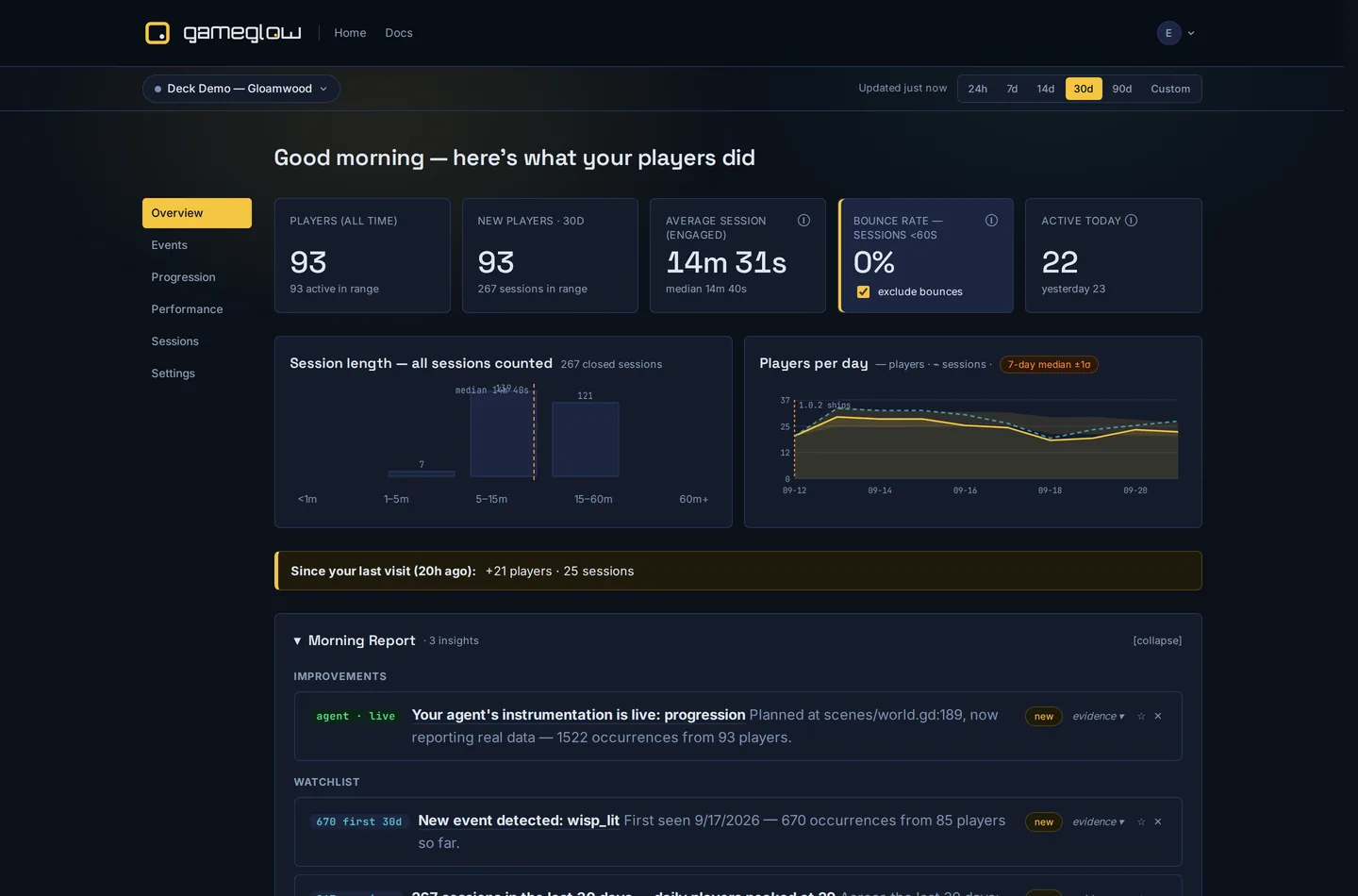
- Five stat tiles answer the questions you ask every morning: how many players, how many new, how long they stay, how many are playing right now
- Players-per-day chart with version-release markers, so a patch shows up in the picture
- The Morning Report surfaces new events and insights without manual digging
How it works
Three steps to live telemetry
Create your game
Sign in (invite-only during the beta) and mint your SDK key: game id and credential in one string.
gg1.<game-id>.<key>Paste it and press Play
Unity: one manifest line plus one settings asset. Godot: copy the addon, turn on the plugin, add your key. Construct 3: install the addon and paste your key.
[gameglow]
api_key="gg1.…"Watch real players
Sessions, performance, and progression flow the moment your game runs. Custom events are there when you want them, never required.
▸ session_start
▸ heartbeat fps_avg=59.8
No tracking code
Telemetry before you write a track() call
The SDK auto-collects everything you need on day one: zero track() calls required. When you want more, the API is one-liners with full params objects. No rigid typed events, no one-numeric-value limits. Another engine? There’s a plain REST endpoint.
- Sessions with 60-second heartbeats, so playtime survives crashes
- FPS average, 1% lows, frame-time p99, hitches, and memory on every heartbeat
- Crash detection, cold-start timing, and engaged-vs-idle awareness
- Platform, OS, engine version, locale, and GPU. Never a device serial.
The SDK never crashes, blocks, or stalls your game. Every failure degrades to dropped telemetry. Offline events queue to memory and disk, replay next launch, and the server dedupes so retries are always safe. And it is small enough to audit: the core is one GDScript file in Godot and two C# files in Unity, with bug reports and feedback in separate, optional modules.
Gameglow.Progression("tutorial/first_wisp", "complete");
Gameglow.ZoneEnter("level_2");
Gameglow.Timing("boss_fight", 34.2);
Gameglow.Track("secret_found",
    new Dictionary<string, object> {
{ "secret_id", "hidden_room" } });Gameglow.track("secret_found", {"secret_id": "hidden_room"})
Gameglow.progression("tutorial/first_wisp", "complete")
Gameglow.zone_enter("level_2")
Gameglow.timing("boss_fight", 34.2, {"boss": "final_boss"})Powerful where it counts
Simple everywhere else
Game analytics that answers the questions a live game forces on you.
Retention & sessions
D1/D7 retention by cohort, DAU, session-length buckets, and an honest "engaged" median that excludes sub-60-second bounces, bounce share shown beside it.
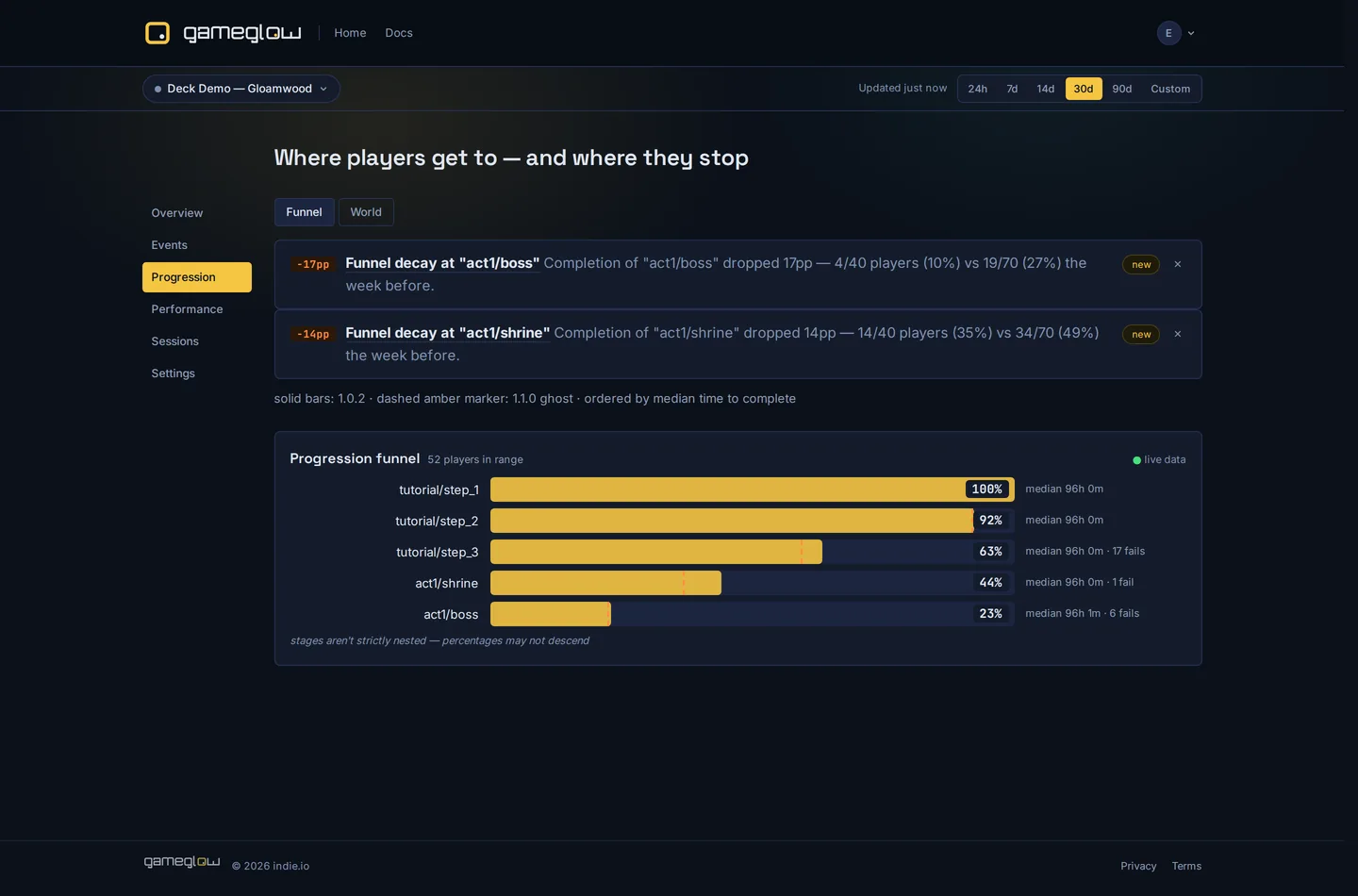
Funnels that build themselves
Progression funnels auto-derive from your events: per-stage completion, starts, fails, median time-to-complete. No manual definitions.
Zones & player flows
Visits, unique players, median visit length, and total time per zone. See where players linger and where they leave.
Performance regressions
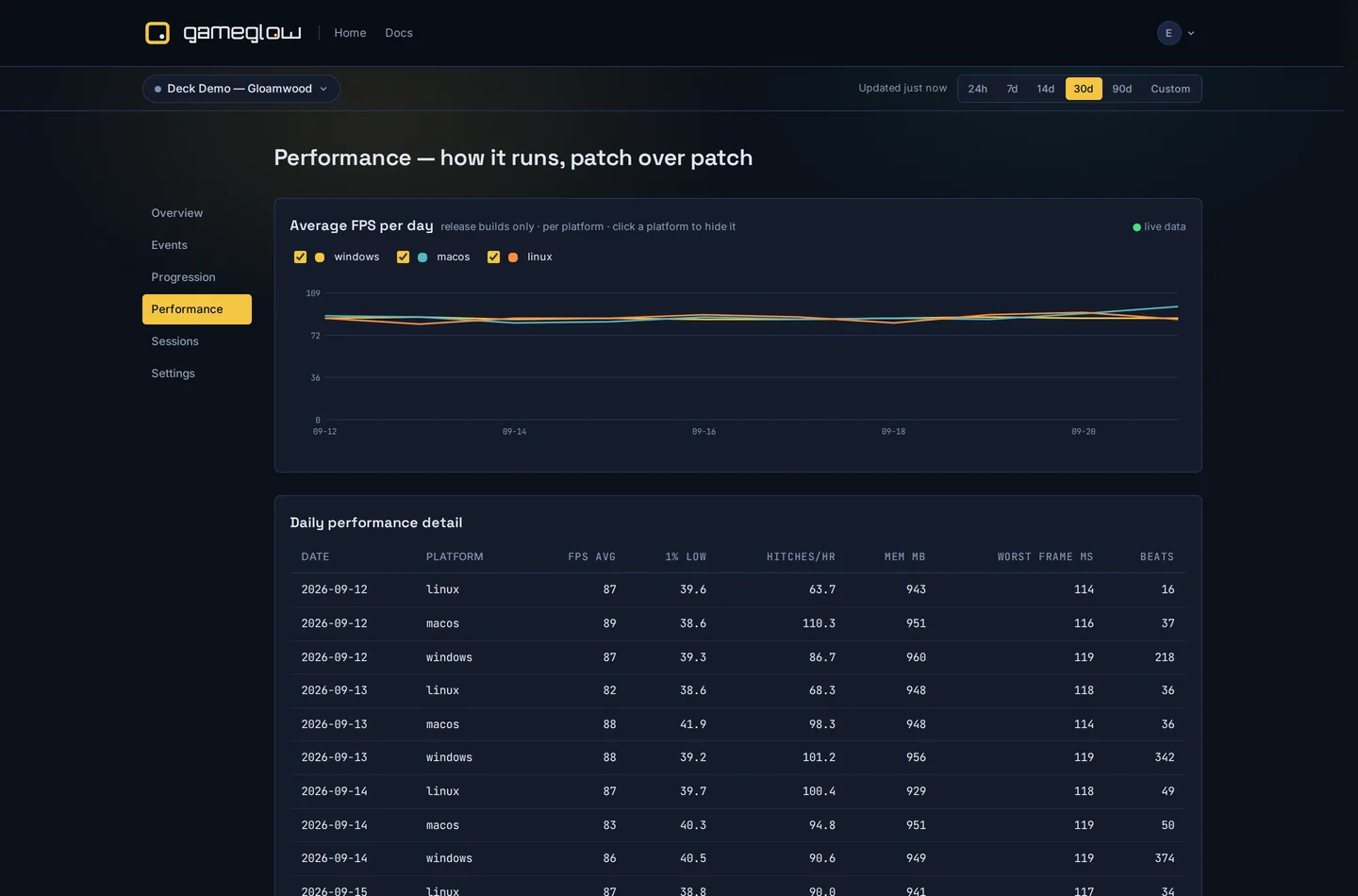
Per-day FPS and hitch series with per-version comparison, so a bad build shows up before the reviews do. Chart gaps render as gaps, never fake zeros.
Raw events & query
Browse raw events with param filters. Run aggregate queries grouped by day, name, platform, version, or any param. Export CSV. All readable in the browser, no engineer required.
Daily insights
Eight deterministic insight rules sweep daily: bounce shifts, funnel decay, crash clusters, retention breaks. Evidence numbers embedded, suggested action included. No ML.
Invite-only beta. No credit card needed.
Agent-native
Your AI agent does the whole integration!
Connect Claude or any MCP-compatible agent with one command, and it does the entire setup for you. It creates your game, generates your API key, writes engine config, instruments events, and re-runs the integration check until it passes. You mint one token and run the game once (in Construct 3, you also install the addon).
claude mcp add --transport http gameglow \
  https://app.gameglow.io/mcp \
  --header "Authorization: Bearer <token>"
No agent? The manual path is the same ten minutes: copy-paste steps, each with the result you should see. llms.txt
- MCP tools cover the whole lifecycle: create_game, mint_api_key, get_sdk_config, integration_check, run_query, get_insights, and more
- Events instrumented by an agent show up marked “Discovered by agent”, before any data arrives
- Setup wizard steps complete themselves as the agent works
- llms.txt served without a login, so agents can read the docs freely
Trust & privacy
Player analytics without player tracking
Every install gets a random per-install UUID. That is the whole identity model. Input tracking is a per-minute yes/no: never which keys, never where.
- No device serials or advertising IDs
- IP addresses never stored with your analytics data, no location
- No player accounts, no names or emails collected by the SDK
- Player opt-out: one call, immediate, persisted, clears the queue. Your settings menu wires straight to it.
- Built games send no analytics before your player agrees
- Self-serve erasure: one call erases a player's events and sessions, no support ticket
Built for indie games
Deliberately not mobile-ads analytics
Built for premium indie games, desktop and Steam first: the games we play ourselves.
- Full params object on every event, no one-numeric-value limit
- Funnels auto-derive from progression, no manual definitions
- Session frequency (median gap between sessions) as a first-class metric
- Sessions equal process lifetime: alt-tabbing never splits a session
- REST ingest for engines beyond Unity, Godot and Construct 3
- No ARPDAU, LTV, or ad-revenue noise
- No rigid three-slot progression hierarchies
- No device serials or advertising IDs

Built by the same team behind indie.io.
indie.io is a publisher and tool storefront for self-published developers: distribution to 60+ channels, all three consoles, and five self-serve tools.
FAQ